
I believe there’s a real benefit to putting coding agents to work in your SDLC, and I see it in my own work. Getting started can be a bumpy road, though. The practices are still being felt out, and core product work is meticulous and rarely one size fits all. Zoom out to the everyday, narrowly scoped problems around your product, and the task gets much easier.
Look past the SDLC
Look at the work that happens around the product or within an organization: opening tickets, onboarding, triage, support. These are easier problems to wrap your head around. Each one has a narrow job, and the information it needs often already sits in your app. It’s also easier to tell when the agent got it right.
They don’t look like much on a conference slide. So far, they’re also the agents I’ve found easiest to build and ship.
Your problem could be simpler than the diagram
A lot of agent talks and posts show an elaborate architecture: a memory store, a vector database, a RAG pipeline, and clouds, cogs and layers connected by arrows. Though your problem may be way simpler than they make it look.
Vector search is one way to get relevant data into the prompt, and it isn’t a requirement. My email agent answers messages with the email thread, the product docs, and content from the marketing site that my app fetches and caches on a schedule. My app reads them and puts them in the prompt. My account config agent handles basic setup chores, like adding a custom field to a form, and it reads the current setup from my app’s database first.
The search step is reading files and running database queries, and the conversation history lives in my app’s database. Additional services aren’t a requirement.
What a narrowly scoped agent looks like
You can use any agent SDK you want. I’m using RubyLLM for this problem because it fits cleanly into my existing system.
In my setup, an agent is a short class with a few tools. It can only do what those tools let it do, so the scope is easy to see.
It runs as an async job inside my Rails app, like any other job. It has its own identity in my app, and that identity has a policy. A policy is a set of permission rules. At minimum, it decides whether the agent may use a tool, and you can extend it to limit which data a tool can reach. The specifics are up to you. The person the agent works for is context: whose request it is, and which account it’s working in.
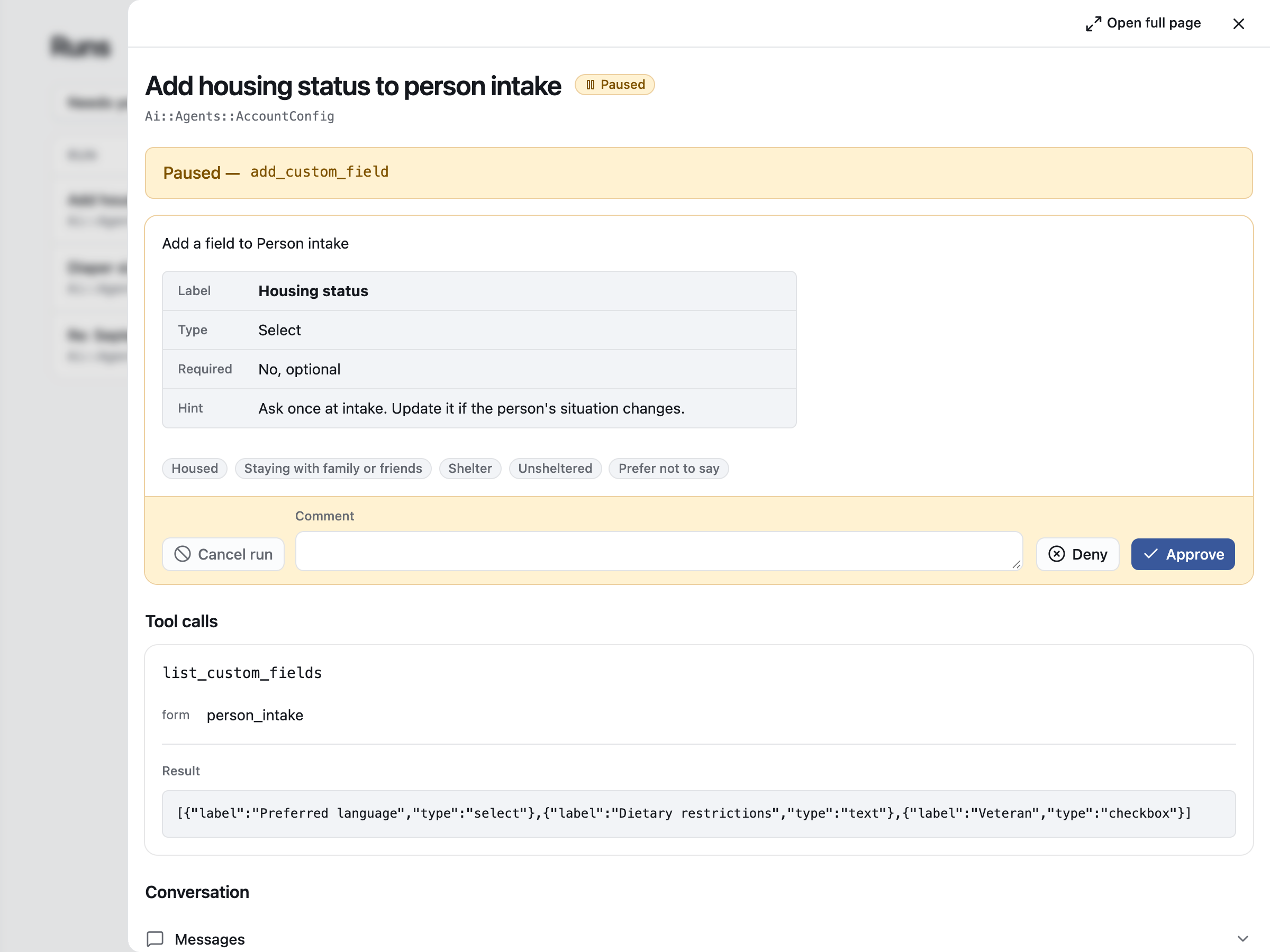
For each tool, you decide whether a call needs a person’s permission. Permission can also change while the agent runs. If your audits and evaluations of the agent in production show its confidence scores dropping, the policy can take a tool away. The agent’s run then pauses and goes to a person for review.
Ship it with the app
When an agent is tied this closely to one job in one app, I ship it with the app. That removes a lot of complexity. There’s no separate service to deploy and no MCP layer between the agent and its data. The agent gets its context and its permissions from the same app it works in.
There’s a time and place to spread agents out into their own services, or to put their tools behind MCP. I’d start simple and split them out when there’s a reason to.
My in-app agent runner prototype
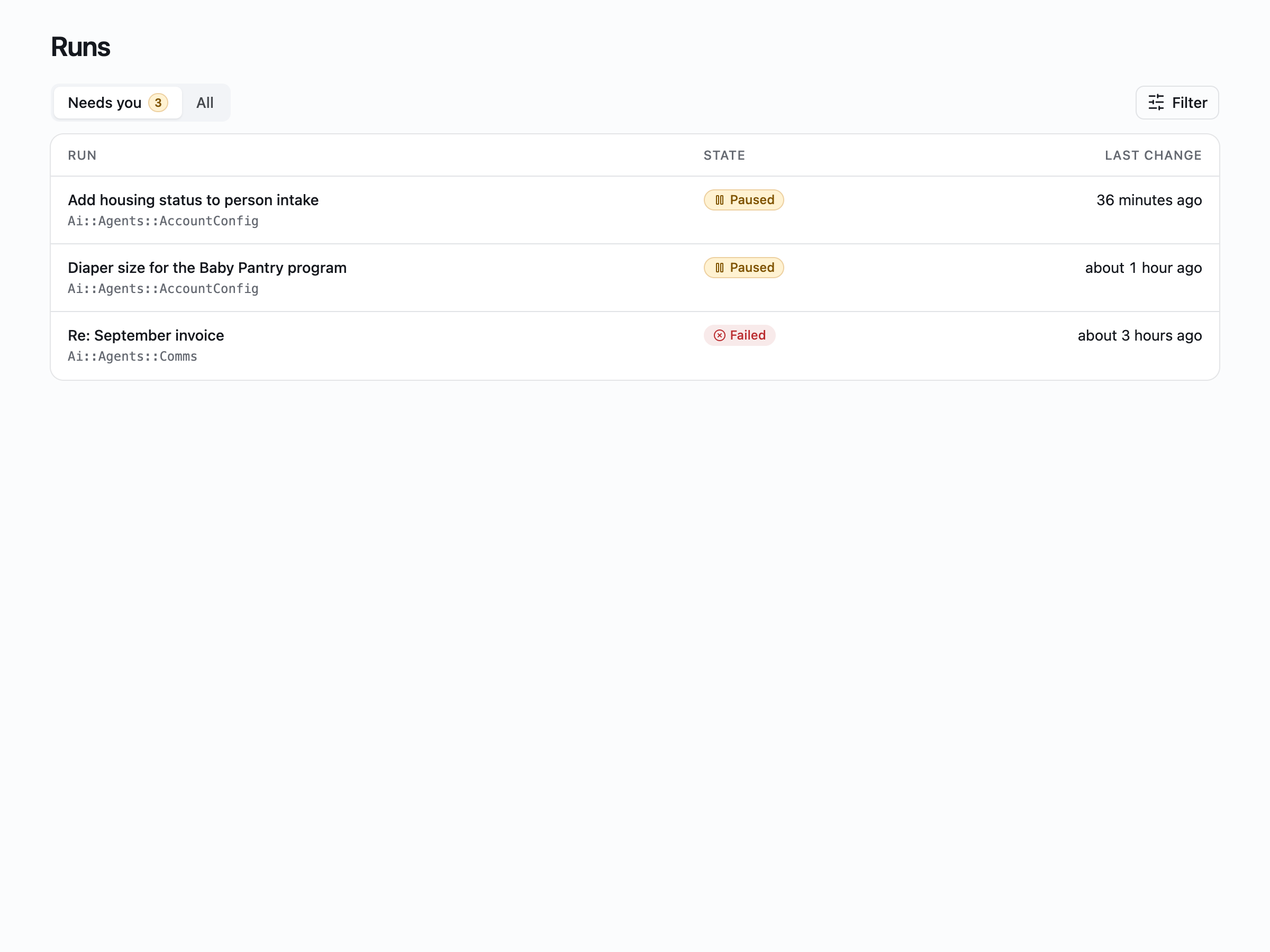
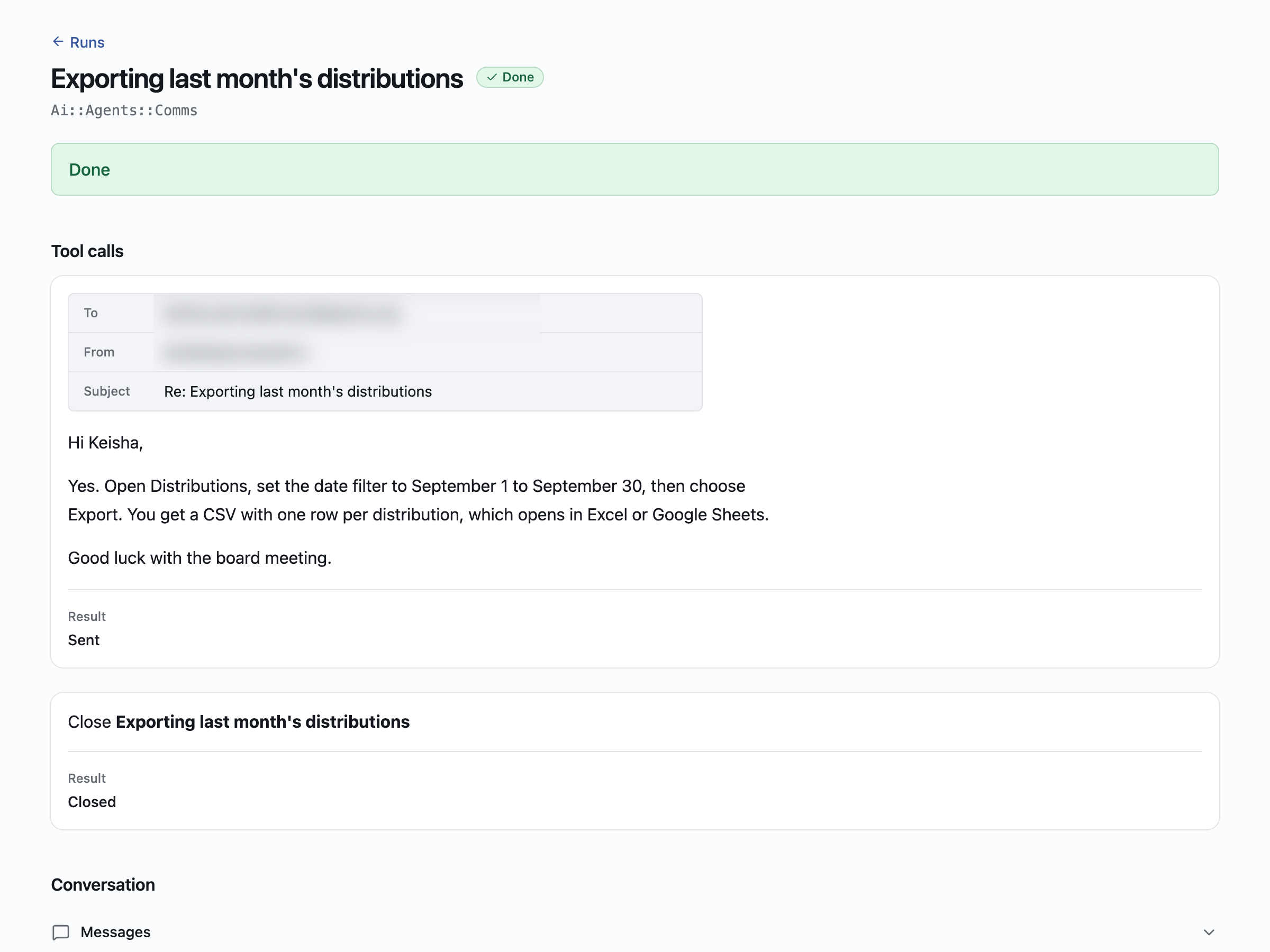
I built a Rails engine to organize the agent runs. It’s a little like Mission Control Jobs for Active Job, but it’s built on RubyLLM. The engine’s dashboard lives in the same Rails app, and it has a tab for the runs that are waiting on a person. The screenshots in this article come from my test setup, with made-up data.
This one is a finished run from the email agent, with the reply it wrote to a staff email.
I’m testing this now. If it works well after some time in production, I’ll probably release the engine.
Start with the small wins
If you’re trying to figure out where agents fit in your company, I’d look at the chores around the product first. Pick one narrow job, give the agent a few tools, and decide what it can do on its own and what needs a person’s sign-off. It’s a smaller project than the diagram suggests, and that’s where I’ve found agents easiest to build so far.
What the code looks like
This is a trimmed version of the prototype. App-specific names are generic, and the work inside each tool is left out.
app/
  ai/
    agents/account_config.rb            # the agent: model, instructions, tools
    application_tool.rb                 # base class for every tool
    tool_permission.rb                  # the check RubyLLM runs before a tool call
    tools/account_config/
      list_custom_fields.rb
      add_custom_field.rb
  policies/ai/
    tool_policy.rb                      # is the agent in good standing?
    tools/account_config/
      add_custom_field_policy.rb        # could the person do this by hand?
db/migrate/
  add_agent_fields_to_admins.rb         # role, eval_score
  add_identity_to_llm_chats.rb          # who acts, and for whom
One tool call goes through this path:
staff request -> async job -> agent picks a tool
                                   |
                                   v
              ToolPermission.check (RubyLLM's requires_approval)
                                   |
        policy says no  -> call refused
        policy says yes -> needs sign-off? -> yes -> waits for a person
                                           -> no  -> runs
The agent names its model, its instructions and its tools:
class AccountConfig < ApplicationAgent
  model "openai/gpt-4.1-mini"
  instructions "You change an account's configuration when one of its users asks. " \
               "Read the current fields first. Propose one change per call."

  tools { [ListCustomFields.new(chat:), AddCustomField.new(chat:)] }
end
Each tool hands RubyLLM’s requires_approval hook to its policy:
class AddCustomField < ApplicationTool
  requires_approval { |tool_call| ToolPermission.check(tool_call, AddCustomFieldPolicy) }

  # description, parameters, execute
end
The check asks the policy first. Only a permitted call gets a person’s decision, or runs on its own if the tool needs no sign-off:
class ToolPermission
  def self.check(tool_call, policy) = permitted?(tool_call, policy) && ToolApproval.decide(tool_call)
end
The base policy checks that the agent is in good standing. Each tool’s policy adds what the person it works for must be allowed to do:
class ToolPolicy
  def invoke? = identity.present? && identity.agent? && !identity.eval_tripped?
end

class AddCustomFieldPolicy < ToolPolicy
  def invoke? = super && user_can?(:admin?)
end
Thanks to Carmine Paolino for RubyLLM and to the Rails team for Rails. Good frameworks are what keep a project like this small.